

Before modern ADCs (Application Delivery Controllers) and cloud-native security solutions took over, many enterprises relied heavily on Threat Management Gateway (TMG) as their frontline defense. For more than a decade, TMG served as a multipurpose security system that protected corporate networks, filtered web access, and controlled external traffic.
Although TMG has now reached its End-of-Life (EOL), understanding how it secured networks provides valuable insight into how modern application security evolved and why next-generation platforms like Edgenexus have become essential replacements.
1. What Was a Threat Management Gateway?
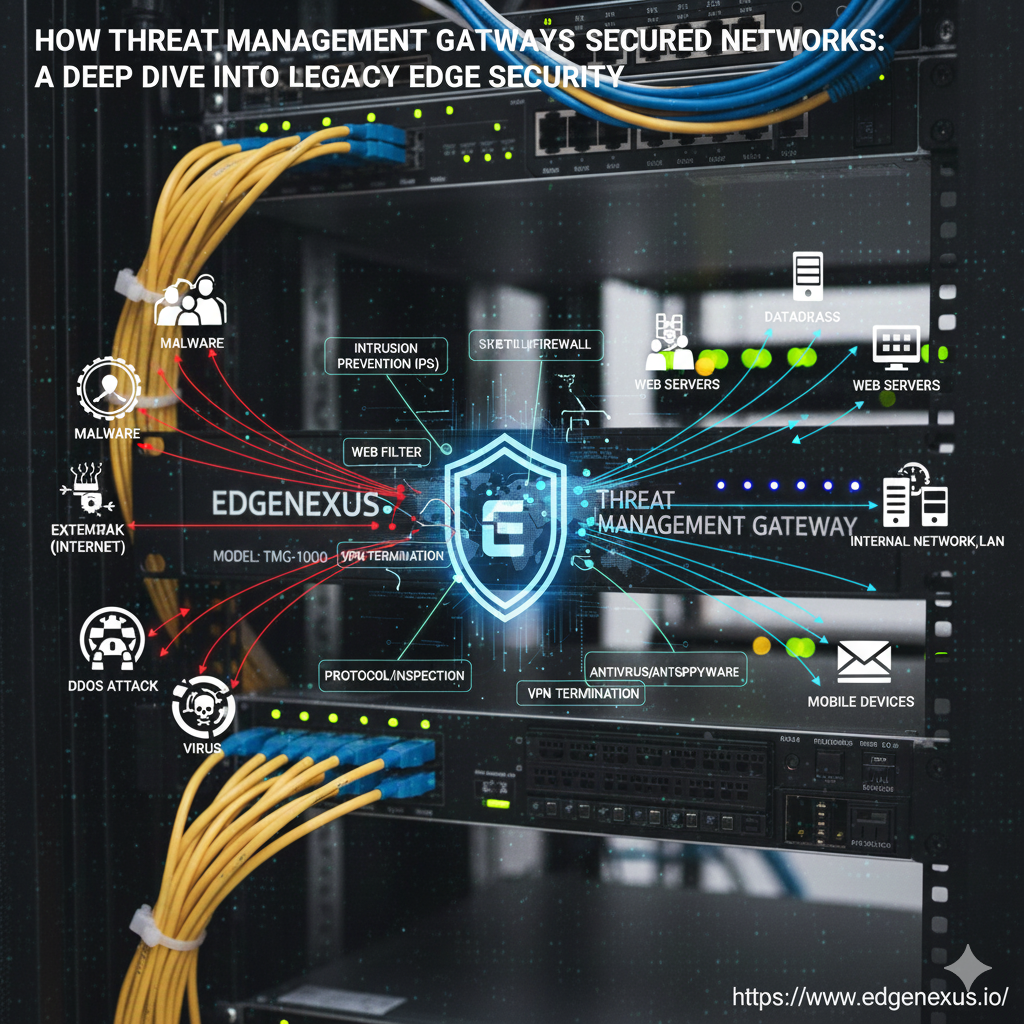
Microsoft Threat Management Gateway (TMG), originally known as ISA Server, was an edge security and access control appliance designed for enterprise networks. Its role was to inspect traffic, filter content, and protect internal servers from external threats.
TMG functioned as an all-in-one:
- Firewall
- Proxy server
- VPN gateway
- Secure web gateway
- Intrusion detection/prevention tool
- Malware scanner
For its time, it delivered a unified approach to security that simplified policy enforcement across large networks.
2. How TMG Secured Networks
TMG played a significant role in enterprise perimeter defense during the early 2000s to mid-2010s. Here’s how it kept networks secure:
2.1 Multi-Layer Firewall Protection
TMG analyzed traffic at multiple OSI layers (L3–L7), making it far more powerful than simple packet filters.
It enabled:
- Stateful packet inspection
- Application-aware filtering
- Fine-grained access rules
- Protocol validation
This allowed TMG to block suspicious behavior long before an attack reached internal servers.
2.2 Secure Web Gateway & Proxy Services
TMG’s most widely used feature was its secure web gateway.
It provided:
- URL filtering to block harmful or unwanted sites
- Content filtering to enforce browsing policies
- HTTP/HTTPS inspection
- Caching to improve performance
By acting as a forward and reverse proxy, TMG ensured that traffic entering or exiting the network complied with corporate policies.
2.3 Gateway-Level Malware Scanning
Unlike basic firewalls, TMG offered integrated malware protection.
It scanned:
- File downloads
- Email attachments
- Web traffic
- Executable content
This helped block malicious payloads before they could infiltrate backend servers.
2.4 SSL/TLS Inspection for Encrypted Traffic
Even when traffic was encrypted, TMG could:
- Terminate SSL sessions
- Inspect the content
- Re-encrypt the data
At a time when encrypted threats were rising, this capability provided visibility into hidden malware or suspicious behavior.
2.5 Remote Access & VPN Security
TMG provided secure VPN access using:
- IPsec
- SSL VPN
- Two-factor authentication (with extensions)
This protected remote workers and branch offices with encrypted tunnels, ensuring safe access to internal resources.
2.6 Intrusion Detection & Threat Prevention
Using signature-based and behavioral detection, TMG could identify and block:
- Port scans
- SQL injection attempts
- Buffer overflow attacks
- DoS traffic patterns
It monitored traffic in real time, automatically preventing potentially harmful activities.
2.7 Application Publishing & Reverse Proxy Capabilities
TMG helped organizations securely publish internal services like:
- Exchange
- SharePoint
- Web applications
It provided an additional security layer before requests reached backend systems.
3. Why TMG Was So Important for Enterprises
For many years, TMG acted as the unified security gateway that businesses depended on. Its appeal included:
Easy integration with Microsoft ecosystems
- Centralized security policy management
- Lower operational complexity compared to multi-appliance setups
- Comprehensive reporting and monitoring
- Strong authentication and access control
This made it particularly popular across:
- Financial institutions
- Healthcare organizations
- Government and public sector
- Enterprise IT environments
But as application architecture evolved, TMG struggled to keep up
4. Limitations of TMG in a Modern Environment
Despite its strengths, TMG was designed for a different era long before microservices, multi-cloud, edge computing, and ADC-driven security.
Major limitations include:
- No support for cloud-native applications
- Limited SSL offloading performance
- Lack of automation, APIs, IaC integration
- Poor compatibility with modern DevOps workflows
- No WAF-level Layer 7 threat protection
- End-of-Life (EOL) with no future updates
- Limited scaling for global, distributed workloads
For these reasons, enterprises have moved toward modern Application Delivery Controllers (ADCs) that provide deeper security, faster performance, and integration across complex architectures.
5. How Modern ADCs Replace & Improve Upon TMG
Platforms like Edgenexus ADC combine:
- Firewall functions
- WAF security
- SSL/TLS offloading
- Traffic intelligence via FlightPath
- GSLB
- Microservice hosting
- Application routing
- API automation
All in one unified system.
Compared to TMG, Edgenexus provides:
| Capability | TMG | Modern ADC (Edgenexus) |
| Firewall | ✔ Basic | ✔ Advanced L7 security |
| SSL Inspection | ✔ Limited | ✔ High-performance SSL offload |
| Web Security | ✔ Proxy-based | ✔ Built-in WAF & bot protection |
| Cloud Support | ✖ None | ✔ Multi-cloud & hybrid-ready |
| Automation | ✖ Minimal | ✔ Full API & DevOps support |
| GSLB | ✖ Not available | ✔ Global traffic optimization |
| Scalability | ✖ Hardware-bound | ✔ Dynamic, virtual, elastic |
This is why ADCs are now the modern standard for network and application security.
Conclusion
Threat Management Gateway played a pivotal role in securing enterprise networks for many years acting as a firewall, proxy, VPN gateway, and malware filter all in one. But with the rise of cloud architecture, microservices, and globally distributed applications, TMG simply cannot meet modern demands.
Modern Application Delivery Controllers, such as Edgenexus, take TMG’s basic security principles and expand them dramatically offering:
- Advanced Layer 7 security
- High-performance SSL offload
- Cloud-native deployment
- Application acceleration
- Intelligent traffic routing
- Automation and DevOps compatibility
For organizations looking to replace legacy security gateways, transitioning to a modern ADC is the most strategic, future-ready move.
Frequently Asked Questions (FAQs)
1. What was the Threat Management Gateway used for?
TMG was used for firewalling, proxy services, web filtering, malware scanning, and VPN security at the network edge.
2. Is TMG still supported today?
No. Microsoft discontinued TMG, and it is no longer supported or updated.
3. Why did enterprises depend on TMG?
It provided a unified security platform that was easy to manage, especially in Microsoft-centric environments.
4. How did TMG identify and mitigate risks?
TMG performed deep packet inspection, monitored protocols, scanned for malware, and used IDS/IPS rules to detect suspicious traffic.
5. Could TMG decrypt and inspect SSL traffic?
Yes, TMG supported SSL/TLS inspection but lacked modern performance optimizations.
6. What replaced TMG?
Modern ADCs, cloud firewalls, WAFs, and secure edge solutions replaced TMG in most organizations.
7. Why can’t TMG support modern applications?
It lacks cloud integration, APIs, automation, DevOps compatibility, and advanced L7 security features.
8. Is an ADC a suitable replacement for TMG?
Yes. ADCs like Edgenexus provide enhanced security, SSL offloading, WAF, DDoS protection, and smart traffic routing.
9. What is the biggest limitation of legacy TMG systems?
Their inability to scale or secure cloud-native, microservices-based, or distributed architectures.
10. How does Edgenexus improve on TMG’s capabilities?
It offers modern security (WAF, SSL, bot filtering), automation, multi-cloud support, GSLB, and high-performance application delivery features.